Entering for someone else
Enter on behalf of an under-18 rider or another competitor with linked accounts.
You can enter events on behalf of other riders — most commonly your children — using Linked Accounts.
Riders under 18
An under-18 rider is registered by a parent or guardian, who then enters events for them. Most events won't accept an entry made from a young rider's own account, for health-and-safety and insurance reasons.
There are two ways to set this up:
- While registering. The first question on the registration form asks whether the account is for a competitor under 18. Answer yes and you'll enter your own details as the guardian, then the young rider's — the two are linked for you.
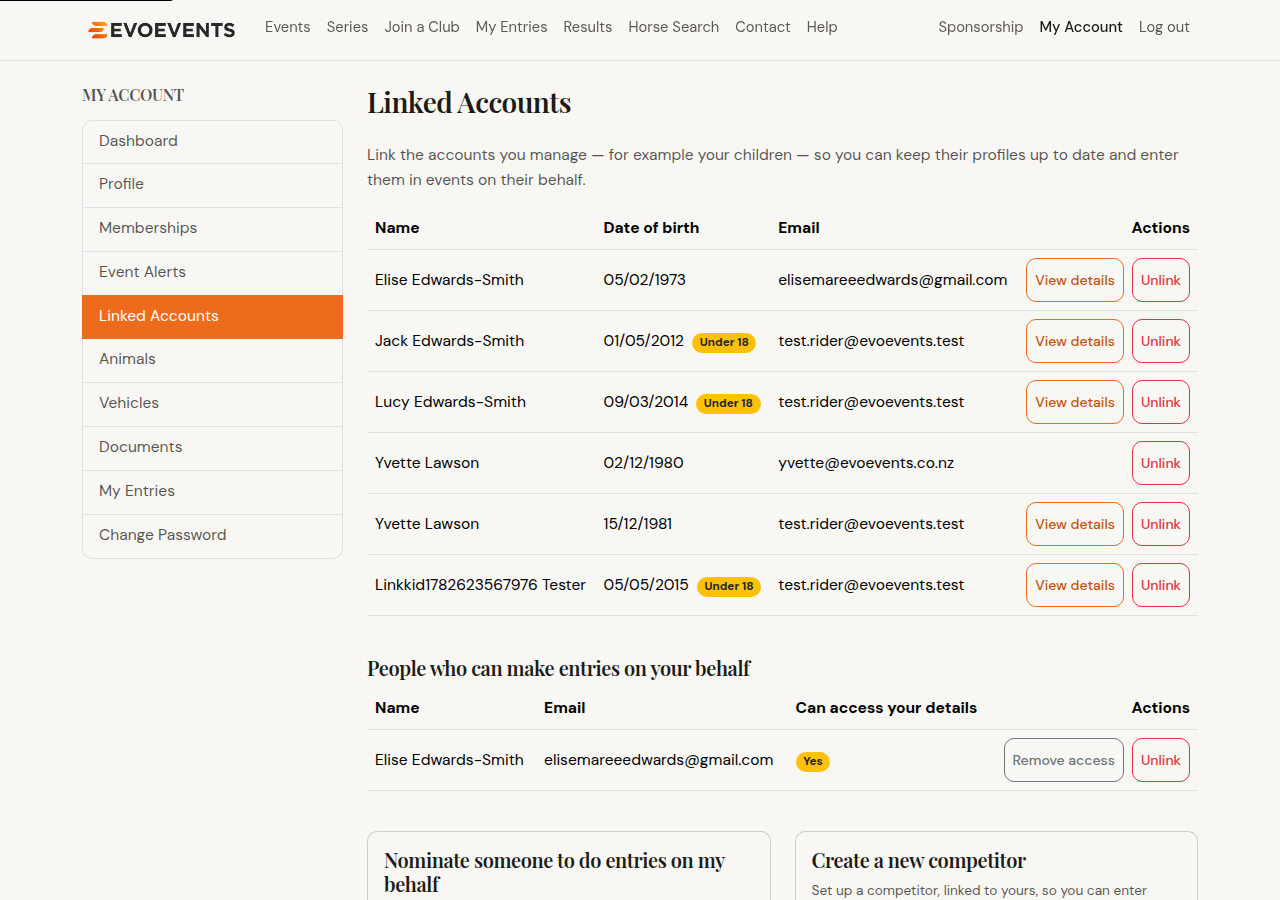
- Afterwards. Go to My Account › Linked Accounts, use the Create a new competitor card, and select Create & link.
Entering for another adult
The same Create a new competitor card works for a competitor of any age. Their date of birth is always required — we use it to check whether they already have an account. When you add someone you confirm that you're authorised to submit entries on their behalf, and that they agree to comply with the relevant ESNZ / Pony Club regulations and each event's conditions of entry.
What "access to details" means
Being linked to someone always lets you enter them in events. Whether you can also view and edit their profile, memberships, email address and animals is a separate setting:
- A competitor you created here — access is on, and you'll see a View details button.
- An existing account you were matched to — access is off. You can enter them, but their own details stay private to them. They can give you access from their own Linked Accounts page.
Who can enter on your behalf
The same page lists people who can make entries on your behalf, with a column showing whether each of them can also see your details. You're in control of that:
- Give access — let them view and edit your details as well as enter for you.
- Remove access — stop them viewing your details, but keep letting them enter for you.
- Unlink — stop them entering for you altogether.
Asking someone to enter for you
Want a trainer, parent or team manager to enter on your behalf? Use Nominate someone to do entries on my behalf on the Linked Accounts page. They must already have an EvoEvents account. Nominations are checked by EvoEvents before they take effect, so allow a little time — they're listed as awaiting review until then.
Still stuck? Contact us and we'll help.