Paying for your entry
Pay by card, POLi, PayPal or internet banking — and what "awaiting payment" means.
Each event is paid separately, directly to that event's organiser. If you've entered more than one event, you'll have a payment for each.
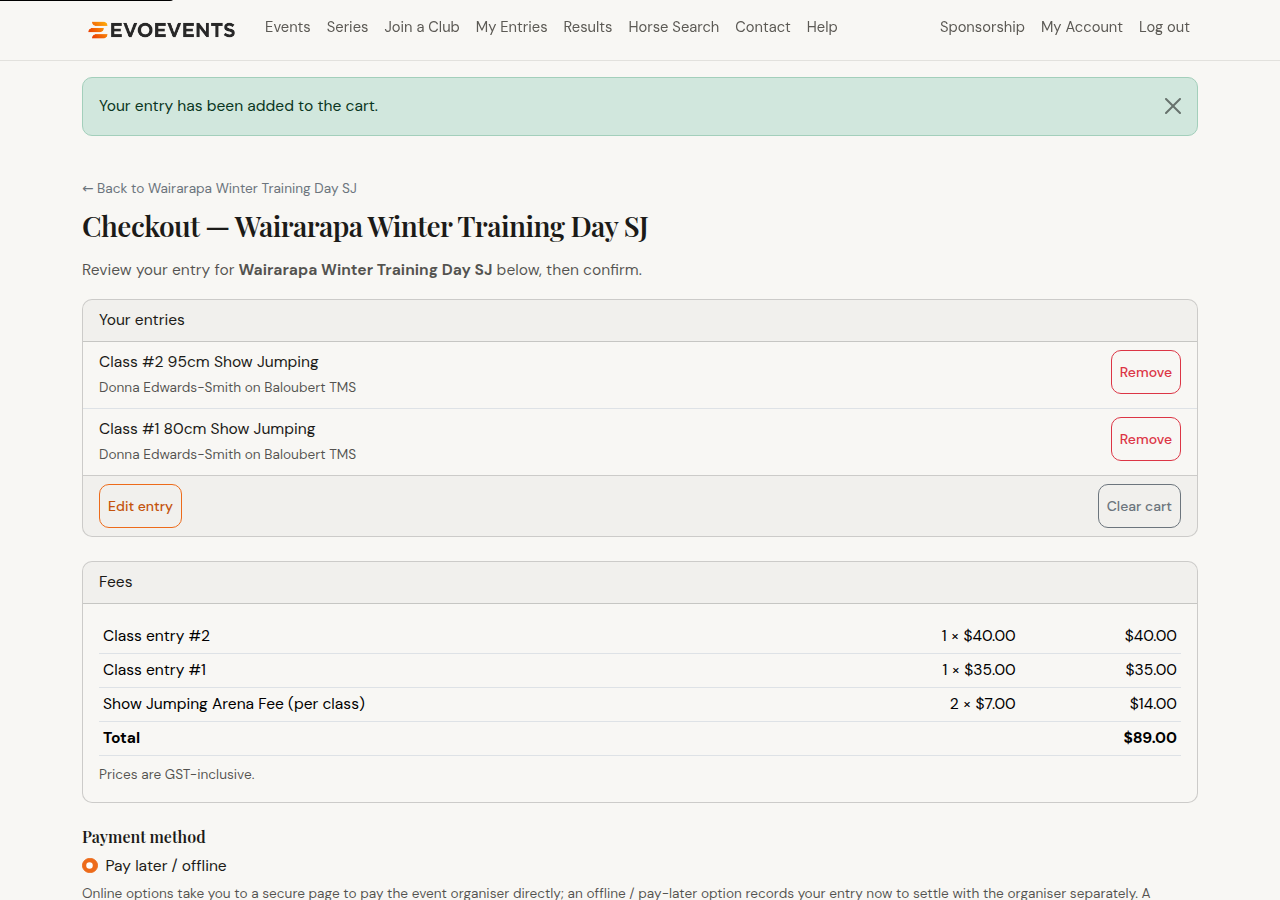
Checking out
- Adding an entry to your cart takes you straight to that event's checkout. To come back to it later, go to My Account — unpaid carts are listed under Pending carts with a Review & pay button.
- Confirm your details — for some entries we'll ask each person being entered to check their next of kin and a few other details before you go on.
- Check the summary — riders, horses, classes and fees.
- Choose a payment method (the options depend on what the organiser offers).
- Select Confirm entry.
Payment methods
You'll only see the methods this organiser offers, which may be any of:
- Credit / debit card — paid securely on the page.
- POLi — pay directly from your bank account.
- PayPal — pay with your PayPal account.
- An offline option — often called Pay later / offline or internet banking, though the organiser may name it differently. Your entry is recorded now and you settle with the organiser separately: for internet banking you'll get an email with the account to pay and the amount. Make the transfer yourself, using your entry number as the reference so the organiser can match it.
When will my entry appear?
Your payment is confirmed straight away, but the entry itself takes about 20 minutes to appear in My Entries. If it's not there immediately, nothing has gone wrong.
"Awaiting payment" on My Account
You may see an entry listed as awaiting payment. There are two kinds:
- Entry held — awaiting payment: the organiser holds your entry until it's paid. Pay to secure your place.
- Entry accepted — awaiting payment: your entry has been accepted, but the fee is still outstanding. Please complete payment.
- Not entered yet — payment required: a few events only accept entries that are paid for online. Yours is not an entry until the payment goes through — it stays in your cart, and any yards you picked are released about an hour after you check out. Use Pay to enter to finish, or come back and check out again.
Either way, use the Pay now button to finish paying. If you've paid by internet banking it stays listed until the event secretary records your payment, so it won't clear the moment your transfer leaves your bank.
A held entry can also be removed if you no longer want it. That releases any yards you'd picked and can't be undone.
Confirmation
When your payment is received we email you a confirmation with your entry details, the classes and fees, any yards you chose, and a PDF receipt. For an entry that's still awaiting payment the email tells you how much to pay and where instead, and the receipt follows once you've paid.
Still stuck? Contact us and we'll help.